


A payment gateway is the software that takes a customer's card or bank details at checkout, encrypts them, and sends them to be approved. An online payment gateway does this on your website. When it handles cards, it is also called a credit card payment gateway. It returns "approved" or "declined" in a few seconds. The gateway does not hold your money: the payment processor routes the transaction and your merchant account receives the funds.
This guide explains how payment gateways work for cards and for bank payments (ACH and eCheck), the main types, what they cost, how they keep card data safe, and how to choose one for an online store or a high-risk business.
What is a Payment Gateway?
A payment gateway is the technology that moves payment information between your customer, your business and the banks involved in a sale. It sits between your checkout page and the financial networks, the way a card terminal sits between a shopper and the bank in a physical store.
Payment gateways are not limited to online sales. Many point-of-sale (POS) systems use a gateway too, connecting the card reader at the counter to the same bank networks; others connect straight to the processor.
Key Functions of Payment Gateways
- Capture: collects the card or bank details the customer enters at checkout.
- Encryption: scrambles that data so it cannot be read if it is intercepted on the way to the banks.
- Authorization: asks the customer's bank whether the payment can go through, and passes the answer back.
- Settlement: sends the day's approved sales in a batch so the money can move to your account.
How Do Payment Gateways Work?
Every card payment makes a round trip through five parties, usually in a few seconds. The request travels down from the customer to their bank, and the answer travels back up the same way. This round trip is often called gateway processing, or the payment transaction flow.
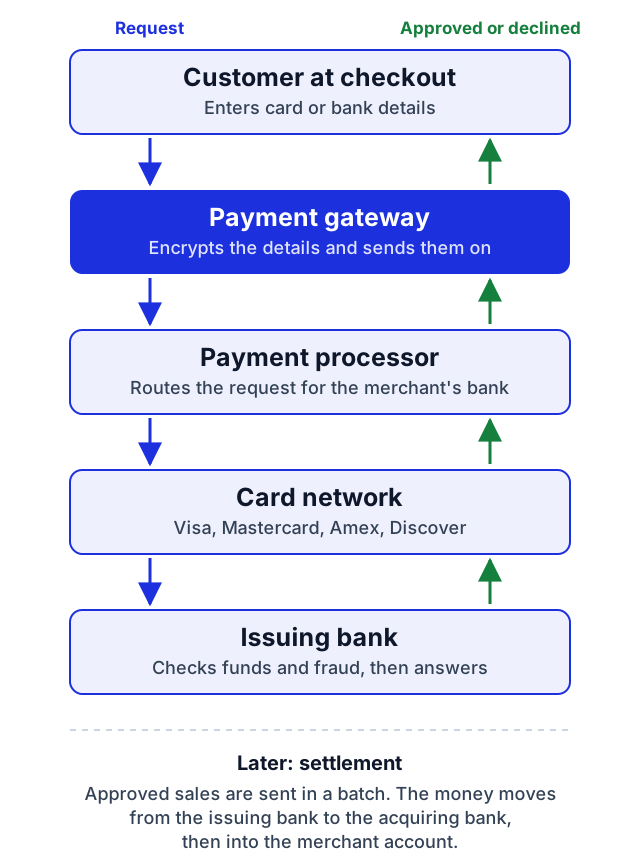
- The customer pays. They enter card or bank details on your checkout page.
- The gateway encrypts the data. Many gateways also replace the card number with a token, a stand-in value that is useless to a thief.
- The processor routes the request. The gateway hands the transaction to the payment processor, which sends it on behalf of your acquiring bank (the bank that holds your merchant account) to the card network, such as Visa or Mastercard.
- The issuing bank decides. The customer's bank checks the details, the available funds or credit, and its fraud signals.
- The answer comes back. Approved or declined travels back through the card network, the processor and the gateway to your checkout page and to the customer.
- Settlement follows. Approved sales go out in a batch, usually at the end of the day. The issuing bank pays your acquiring bank, which deposits the money, less fees, into your merchant account.
How ACH and eCheck Payments Move Through a Gateway
Bank payments take a different road from cards. There is no card network and no instant approval from the customer's bank. Instead, the payment travels through the ACH network, the system US banks use to move money between accounts, under rules set by Nacha.
- The customer authorizes the debit. They enter their routing and account number at checkout, or type the details from a paper check for an eCheck, and agree to the charge.
- The gateway checks the account. Good gateways verify that the account exists and is open before the payment is sent, which cuts returns.
- The payment goes out in a batch. Your processor sends it to your bank, which passes it to the ACH network and on to the customer's bank.
- The money settles. Standard ACH settles in one to three business days. Same-day ACH is faster for eligible payments.
- Returns come back with a code. If the payment fails, the customer's bank returns it with a reason code, such as R01 for insufficient funds or R10 for a debit the customer says they did not authorize.
ACH has no card-style chargebacks, but it has its own limits. A customer can dispute an unauthorized debit for up to 60 days after their statement, and Nacha expects merchants to keep unauthorized returns below 0.5% of debits (Nacha return rate rules). See ACH processing, eCheck processing and SeamlessACH.
Types of Payment Gateways
Gateways differ in where the customer types their card details. That choice decides how your checkout looks and how much of the security work falls on you.
- Hosted: the customer is sent to the gateway's own payment page, then back to your site. It is the simplest setup and the least security work, because card data never touches your site. Under PCI DSS v4.0.1 this usually means the shortest self-assessment questionnaire, SAQ A.
- API-integrated: payment fields sit on your checkout page and talk to the gateway directly, often as fields the gateway hosts inside your page. Shoppers never leave your store, and you keep your pages secure. Fields the gateway hosts in an iframe usually keep you on SAQ A; a form on your page that posts straight to the gateway moves you to SAQ A-EP.
- Self-hosted: your own server collects the details, then sends them to the gateway. It suits large businesses with their own payments team, because you carry most of the PCI DSS compliance work, usually the full SAQ D or an on-site assessment.
You will also see "payment gateway services" sold two ways: as a gateway on its own, which you connect to a separate processor and merchant account, or bundled with them as one service.
Payment Gateway vs. Payment Processor vs. Merchant Account
You need all three to take card payments online. They are often sold together, which is why the names get mixed up.
| What it does | Does it touch the money? | |
|---|---|---|
| Payment gateway | Captures and encrypts payment details, and passes the approval back to your checkout | No |
| Payment processor | Routes the transaction between your bank, the card networks and the customer's bank | It moves the transaction and settlement messages |
| Merchant account | A bank account where card sales land before they reach your business bank account | Yes: this is where the money arrives |
For more detail, read payment gateway vs. payment processor, merchant accounts vs. payment gateways and what a merchant account is.
Payment Gateway Fees
Gateway pricing has a few common parts. Not every provider charges all of them, so compare the total cost at your own sales volume.
- Setup fee: a one-time charge to open the gateway account.
- Monthly fee: a flat charge for access to the gateway.
- Per-transaction fee: a small fixed charge each time the gateway handles a payment.
- Processing fees: charged by the processor, not the gateway. They are usually a percentage of the sale plus a fixed amount, such as 2.9% plus $0.30. Flat-rate pricing charges one rate for every card. Interchange-plus pricing passes on the card network's own cost for each card (interchange) plus a fixed markup, which is usually cheaper at higher volume and easier to audit.
- Other fees: PCI compliance, chargebacks, and early termination if you leave a contract early.
An all-in-one provider bills the gateway, processing and merchant account together, which makes the total easier to see. Accepting ACH and eCheck payments next to cards can also lower costs: with SeamlessChex, ACH and eCheck payments cost up to 90% less than cards. For example, at a 2.9% card rate, $50,000 a month in card sales costs about $1,450 in percentage fees alone. Taking those same payments by ACH or eCheck would cost up to 90% less, which could bring that figure down to around $145. See our guide to transaction fees for how each charge is calculated.
Payment Gateway Security: PCI DSS, Tokenization and 3-D Secure
A gateway is only as useful as the trust customers place in it. Three safeguards matter most.
- PCI DSS: the Payment Card Industry Data Security Standard (version 4.0.1 today), the security rules every business that accepts cards must follow. Choose a gateway that is PCI DSS compliant, and pick a hosted or embedded checkout to keep card data off your own servers.
- Tokenization: replaces the card number with a token at the first payment. You can charge repeat customers and subscriptions without storing the real number.
- 3-D Secure: an extra check by the customer's bank. Most checks now run silently in the background; the shopper only sees a code or a banking-app prompt when the bank flags the payment. It cuts fraud and can shift liability for some fraud chargebacks from you to the bank. See how 3-D Secure affects your business.
Encryption on every page (HTTPS) and fraud filters, such as address verification (AVS) and security-code (CVV) checks, complete the basics. Read more in how to improve online payment security.
Payment Gateways for Ecommerce
For an online store, the gateway is part of the checkout, so how it connects to your store matters as much as its price.
- Platform plugins: most stores run on a platform such as Shopify or WooCommerce. A ready-made plugin connects the gateway without custom code.
- Checkout style: a hosted page is quickest to launch. Embedded fields keep shoppers on your site, which many stores prefer for conversion. See how to integrate a payment gateway with your ecommerce website.
- Payment methods: offer more than cards. ACH and eCheck let customers pay straight from a bank account, which helps buyers without a credit card and suits larger orders.
- Recurring billing: subscriptions and payment plans need tokenization and automatic retries for failed payments.
SeamlessChex offers online stores credit card, ACH and eCheck processing. See ecommerce payment processing.
Payment Gateways for High-Risk Businesses
Businesses in industries banks see as risky, such as nutraceuticals, online gaming, travel or subscription services, often find that mainstream payment apps limit or close their accounts. Those apps put all their merchants on one shared account and drop the ones that look risky.
A high-risk business needs a gateway that works with a dedicated high-risk merchant account. Look for:
- Acceptance of your industry in writing, before you sign
- Strong fraud and chargeback tools, because chargeback ratios decide whether you keep your account
- Support for more than one processor, so a backup bank can keep you taking payments if one account is paused
- Bank payments (ACH and eCheck) as a second option. They have no card chargebacks, though ACH returns apply
Learn more about high-risk credit card processing and the benefits of high-risk payment gateways.
Popular Payment Gateway Providers
These are some of the best-known gateways. Some are all-in-one payment apps that limit high-risk businesses; others are gateways you connect to your own merchant account.
| Provider | Best for | High-risk businesses |
|---|---|---|
| PayPal | Small stores that want a checkout shoppers recognize | Restricted |
| Stripe | Developers who want a flexible API | Restricted |
| Square | Shops that sell in person and online | Restricted |
| Braintree | Apps and marketplaces, owned by PayPal | Restricted |
| Authorize.Net | Businesses that bring their own merchant account | Through your merchant account |
| NMI | Processors and high-risk providers that build on it | Through your merchant account |
| Cybersource | Large businesses, owned by Visa | Through your merchant account |
| Adyen | Global businesses selling in many currencies | Case by case |
If you need same-day access to your money, compare the best instant settlement payment gateways.
How to Choose a Payment Gateway: Checklist
- It accepts your business. Confirm your industry is allowed, especially if you are high-risk.
- It fits your store. Check for a plugin for your platform, or an API your developers can use.
- It takes the payments your customers use: cards, digital wallets, ACH and eCheck.
- It is secure: PCI DSS compliant, with tokenization, 3-D Secure and fraud filters.
- The total cost is clear: setup, monthly, per-transaction and processing fees added up at your volume.
- Payouts are fast enough for your cash flow.
- Support is reachable when a payment fails.
The SeamlessChex payment gateway handles cards, ACH and eCheck in one account, and works with NMI, Shopify and WooCommerce. See SeamlessChex merchant services to get started.
Payment Gateway FAQ
What are payment gateway services?
Payment gateway services are the tools a provider sells to capture, encrypt and approve payments on your website or in your store. Some providers sell the gateway on its own. Others bundle it with payment processing and a merchant account.
Is a payment gateway the same as a payment processor?
No. The gateway captures and encrypts the payment details at checkout. The processor routes the transaction between the banks and card networks. You need both, and many providers sell them together.
Do I need a merchant account to use a payment gateway?
Yes, to accept cards. The merchant account is where card sales land before reaching your business bank account. All-in-one providers set up the merchant account and the gateway together.
How much does a payment gateway cost?
It depends on the provider. Costs can include a setup fee, a monthly fee and a small fee per transaction, on top of the processor's percentage of each sale. Compare the total at your own sales volume.
Is PayPal a payment gateway?
Yes, and more. PayPal works as a payment gateway, a processor and a wallet in one. It holds your sales in its own account rather than a merchant account in your name, which is why it can limit or freeze high-risk businesses quickly.
Is Stripe a payment gateway?
Yes. Stripe combines a payment gateway, processing and an account for your sales in one service. Like PayPal, it restricts many high-risk industries.
Is there a free payment gateway?
Some providers charge no setup or monthly gateway fee, but no gateway is free to use: you still pay processing fees on each sale. Compare the total cost, not just the gateway fee.
How long until I get paid?
Card sales usually reach your bank account in one to three business days after the batch settles, depending on your provider. Standard ACH payments settle in one to three business days, and same-day ACH can be faster.
How long does a payment gateway take to approve a payment?
Usually a few seconds. The money itself arrives later, when the day's approved sales settle into your merchant account.
Can a payment gateway accept ACH and eCheck payments?
Some can. ACH and eCheck move money straight from the customer's bank account. SeamlessChex offers credit card, ACH and eCheck processing, and its ACH and eCheck payments cost up to 90% less than cards.